
Inbetween bug, usability report and feature request ;):
Due to network restrictions, I just wanted to offline install vvvv on several recently resetted (Windows11) machines at our university but had not the best expericence, or better said, I failed at the end with the offline installation - I decided to give a quick report about this struggle:
1.) Wouldn’t it be a nice-to-have to also give a hint where to find the offline installation on the download page as e.g. adding “Offline Installer” here?:
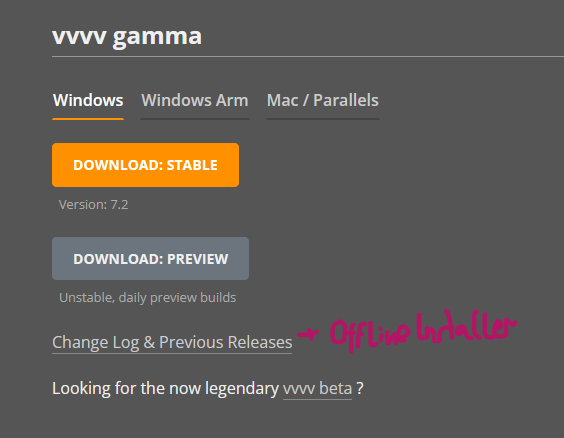
2.) The link to the offline installation for 7.2 x64 on the Changelog vvvv gamma 7.2 | vvvv gamma documentation does not lead to the correct link (7.1 is linked instead, but also link doesn’t work) (the correct one is https://teamcity.vvvv.org/guestAuth/app/rest/builds/id:40001/artifacts/content/vvvv_gamma_7.2-win-x64_setup_offline.exe)
3.) After installing from the Offline-Installer on one machine, I was first surprised I do not need additional downloads. But the realized when starting vvvv gamma, I will still need to additionally download the .NET SDKs (okay I already guessed before I may need to)
→ wouldn’t it make more sense to already inform about necessary prerequisites on the download/changelog page
→ and while/after the installation instead of only when starting the app?
→ evtl. also giving an option/links to additional downloads during the installation
→ if internet acces is possible, also to continue with automatic download
4.) After starting vvvv, you’ll get the hint about necessary additional downloads, which is fine - however I ecpected to get this information already during the installation, and informing about those One-by-one is a bit complicated
→ why not the same automated download again as within the webinstaller if internet is available?
→ i remember this splash screen when gamma was released with green/read square for the prerequisites plus links, why not again using this one for missing installations?
5.) After installing the .NET downloads vvvv was giving me a hint one after one on antother machine, vvvv gamma opened up, but still with the Exeption “Failed to find all versions of .NET Core MSBuild…" → not giving me an idea what was still missing. so I decided to give up on this attempt .…
→ after all those steps I uninstalled vvvv and went back to get internet acces and install vvvv with the standard (online-)installer. :/
However I can absolutely understand, this is not a very common usecase and is not worth putting much time into it - but at least an accesible list to necessary prerequisites/dependencies, ideally with download links on the changelog might be a quick first solution :)